Fact Sheets
Introduction
The FusionFabric.cloud self-hosted API Gateway is a reverse proxy that acts as an API front-end that receives API requests, enforces throttling and security policies, passes requests to the back-end service, and then passes the response back to the requester. A back-end service, to which an API Gateway proxies API requests, exposes APIs connected to a back-end or core banking system that processes banking transactions across the various business domains of a bank.
Benefits
With the self-hosted API gateway, you have the flexibility to deploy a containerized version of the FusionFabric.cloud API Management gateway component to the same environments where you host your APIs. Placing the gateways close to the APIs allow you to optimize API traffic flows and address security requirements and removes the cloud API data plane from regulatory and residency concerns of a bank environment.
Architecture
The self-hosted API Gateway service is composed of the following key components:
Control plane Services: A gateway-configurator application that connects to the FusionFabric.cloudgateway-management service which is exposed as an API and used to configure the self-hosted API gateway. It provides API specifications, policies of the apps you consented to on the FusionFabric.cloud platform. Only outbound connectivity from the banks network to FusionFabric.cloud is needed.
Data Plane Services: The on-premise, self-hosted API Gateway. It is responsible for proxying API requests, applying policies retrieved from the FusionFabric.cloud control plane, enforce security (for example, token validation), and collecting telemetry.
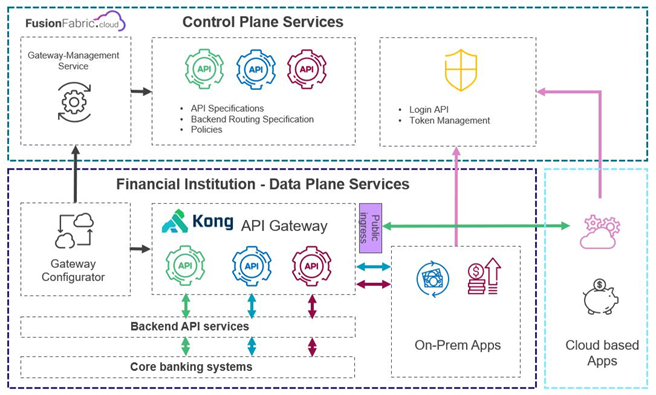
Control Plane Services
Operational Requirements
Deployment
The FusionFabric.cloud self-hosted API Gateway is an application delivered as a set of container images and a Kubernetes Helm chart. A gateway deployment consists of 3 application nodes, configured in vertically scaled sizes of small, medium, or large, based on the required performance.
Kubernetes
The gateway application is delivered as a Helm chart in a repository at Finastra Registry. This chart references container images from the same registry. Helm and Docker login operations are required to access these assets.
The operator interaction is to pull the chart and images from the Finastra registry and push them into a customer-hosted registry. You are expected to manage repository pull secrets for deploying the helm release to the target environment.
Helm chart configuration:
- Gateway credentials for interacting with FusionFabric.cloud gateway-management APIs, supplied as a Kubernetes Secret reference.
- Optional Kubernetes Ingress annotations, host, path, and TLS settings. Additional ingress configuration options can be provided if needed.
Networking
Ingress
Load balancing to the gateway application nodes is to be managed by you. It is expected that the gateway is accessed using the internal ClusterIP Service and explicitly made available for you outside of the Kubernetes cluster by environment-specific means. The FusionFabric.cloud self-hosted API Gateway Helm chart supports the definition of a Kubernetes Ingress resource if that ingress mechanism is suitable for the your deployment environment.
Egress
The following egress traffic must be allowed for the self-hosted API Gateway application to work:
| Host - IP Address | Port | Direction | Notes |
registry.finastra.com -
158.255.104.10 |
443 | outgoing | Connections to Finastra Registry must be allowed during the installation to allow the Docker images to be pulled. This rule is not needed if the images are pulled before installation and stored in an on-premise image registry, rather than pulled directly from Finastra Registry during the installation phase. |
api.fusionfabric.cloud -
13.90.153.221 |
443 | outgoing | By default, API Gateway will authenticate incoming requests with FusionFabric.cloud identity provider (IDP). Authentication is done with OIDC key set provided by the Authorization Server. This rule is not needed if API Gateway is configured to use only on-premise IDP. |
Software Requirements
Server Software
The pre-requisites is to have a Kubernetes cluster available.
Finastra has validated the gateway on OpenShift. Other Kubernetes stack are supported.
| Software | Minimum Version | Notes |
|---|---|---|
| Red Had Openshift | 4.4 | The service that provides the container platform where the API Gateway is installed. |
Client Software
| Software | Minimum Version | Notes |
|---|---|---|
| Linux Operating System | see Notes | The operating system upon the installation is ran. Any recent Linux distribution, such as Red Had Enterprise Linux 8, or Ubuntu latest LTS. |
| OpenShift CLI | 4.4 | oc is the command line interface for Red Hat Openshift. |
| Helm | 3.0 | The package manager for Kubernetsthat is running on Red Had Openshift. |
| Kubectl (optional) | 1.17 | The command line interface for Kubernets, that can be used on clusters not
deployed on Red Hat Openshift. In most cases, oc and kubectl commands can
be used interchangeably, although oc is recommended. |
| 7 Zip | latest version | 7 Zip is the archive manager needed to unpack encrypted archives with the Gateway configuration and installation scripts. |